
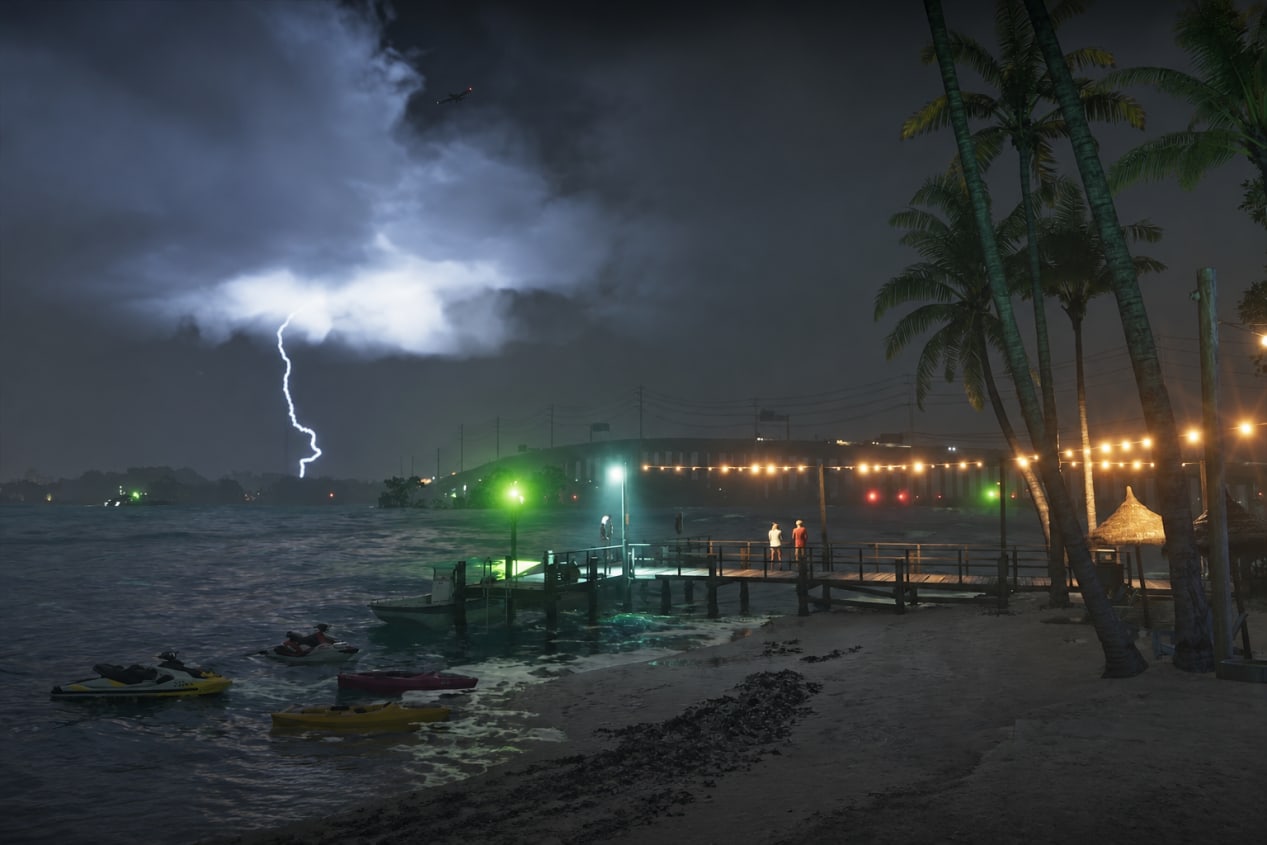
Rain changes what you can read from the road. A junction that is easy to spot in sunshine may demand an earlier speed adjustment when the view ahead becomes unclear. GTA 6’s localized weather also means clear skies above your car do not guarantee clear conditions farther along your route. Storms can be visible from a dry area, with rainfall occurring in another part of Leonida.
Before spending GTA 6 Money on another vehicle, get comfortable driving a familiar one through changing conditions. Knowing how accurately you can place the car through a corner is more useful than assuming a higher price guarantees better performance in rain.
The driving recommendations below focus on visibility, controlled inputs, and route selection. They are practical suggestions, not claims about measured traction losses, fixed braking penalties, or weather-specific vehicle bonuses.
How Weather Moves Across Leonida
A Storm Can Be Ahead of You, Not Above You
Cloud systems move independently, and approaching a distant storm produces a gradual environmental transition. Dark clouds, lightning, and visible rainfall can help distinguish the storm area from the clearer surroundings.
For a longer journey, use the horizon as an extra route check. Look toward your destination before accelerating onto an unfamiliar road. If the view in that direction is becoming difficult to read, identify the next major junction while you still have a clear reference.
A distant storm is an observation, not a precise forecast. Do not assign it a guaranteed arrival time or assume it will follow the same path on every trip.
Rain Leaves Evidence Behind
Wet conditions do not vanish as soon as rainfall stops. Puddles and wet surfaces persist after a shower, allowing an area to look recently soaked even when the sky has cleared.
That creates a useful distinction between three situations:
- Approaching rain: Watch how clearly you can see the road ahead.
- Driving through rain: Keep your attention on junctions, traffic, and usable space.
- Driving after rain: Assess the road itself rather than treating a brighter sky as proof that every surface has dried.
Visual wetness is not a calibrated grip indicator. A reflective patch does not, by itself, establish a specific stopping distance or confirm aquaplaning.
Rain and Thunderstorms: What Should Change Your Driving?
Judge conditions by what you can identify on screen. If you can no longer recognize the next turn early enough to approach it calmly, reduce speed before reaching it.
The table below is a decision aid, not a set of hidden gameplay modifiers.
| Situation | What to check | Practical response |
| Rain begins during a familiar drive | Whether your usual turning points remain visible | Keep a steady line and reassess your pace |
| Rain obscures a junction | Whether you can identify the correct exit before entering | Slow down early instead of making a last-second correction |
| A storm lies along your route | Whether the next section is familiar and easy to follow | Compare it with a clearer, more recognizable alternative |
| Wet roads reflect bright lighting | Whether reflections distract from the actual road edge | Use curbs, barriers, and lane boundaries as reference points |
| Distant detail becomes indistinct | Whether bends and obstacles remain readable | Shorten the distance between your next observation and decision |
Keep Lightning Separate from Driving Information
Lightning is part of the storm presentation, but a flash should not become your cue to accelerate through an unclear section. Use persistent references, such as the road boundary and the direction of traffic, rather than relying on a brief change in illumination.
Nor should a dramatic storm be treated as proof of a particular mission penalty. Tropical storms and hurricanes have been confirmed, but their existence alone does not establish a universal rule for road closures, mission failure, or character damage. The available developer details do not provide a complete schedule or list of consequences for those larger storms.
Rainy-Day Driving Without Guessing at Handling Statistics
Brake Before the Decision Point
Give yourself time to choose a line before entering a bend or junction. Waiting until you are already turning leaves less room to deal with a missed exit or an obstacle.
A controlled approach looks like this:
- 1. Read the next section. Identify the bend, junction, or gap you intend to use.
- 2. Adjust your speed on the approach. Do not wait for the turn to fill the screen.
- 3. Choose a line with room for correction. Avoid squeezing between traffic and a barrier without an escape route.
- 4. Turn with deliberate inputs. Resist adding several sharp corrections in quick succession.
- 5. Accelerate once the direction is settled. Check the next stretch before committing to more speed.
This sequence is useful because it separates decisions. It does not depend on an unverified claim that rain reduces every vehicle’s grip by the same amount.
Test an Unfamiliar Car Away from Complicated Junctions
Do not make your first serious handling test a fast turn through dense traffic. Choose a straightforward stretch where you can observe the vehicle without several other problems competing for attention.
Try a controlled stop and a moderate corner. Notice how much steering correction you need and how confidently you can place the car.
If you want to compare dry and wet driving, keep the test consistent:
- Use the same vehicle.
- Revisit the same road section.
- Approach at a similar pace.
- Avoid comparing a clean run with one interrupted by collisions.
- Repeat an unexpected result before treating it as a general rule.
One slide does not establish a weather mechanic. It may also reflect speed, steering input, contact with another vehicle, or the characteristics of the car.
Let a Missed Turn Stay Missed
A missed exit is easier to manage than an abrupt correction across traffic. Continue until you can change direction deliberately.
Check the map before a complicated junction, then return your attention to the road. Trying to interpret a route marker, adjust the camera, brake, and turn at the same moment creates an avoidable workload.
Choosing a Route When Visibility Drops
Count Difficult Decisions, Not Just Distance
A short route can still be awkward if it contains several unfamiliar turns. When comparing alternatives, look at the number of decisions you will need to make under poor visibility.
Favor a route with:
- Recognizable junctions.
- Clearly distinguishable road boundaries.
- Fewer abrupt changes of direction.
- Space to recover from a missed turn.
- A familiar approach to the destination.
These are selection criteria, not guarantees that a particular class of road receives a weather advantage.
Highways and Side Streets Solve Different Problems
A broad road may offer fewer turns, but that does not make a fast approach sensible when the view ahead is unclear. A familiar side street may be easier to follow, yet repeated junctions can demand more attention.
Choose based on the problem in front of you. If identifying exits is difficult, reduce route complexity. If keeping the car accurately positioned is the problem, lower your pace before looking for a shortcut.
Do not reroute simply because another road looks shorter on the map. Change routes when the alternative removes a specific difficulty.
Inspect Shoreline Shortcuts Before Entering Them
Near water, confirm where the usable route ends before leaving a recognizable road. If the boundary between the path and surrounding terrain is unclear, stop and inspect it rather than committing at speed.
Visible water is not enough to prove dynamic flooding. Avoid assuming a route has become submerged unless the scene actually supports that conclusion.
Outdoor Exploration During and After Rain
Keep a Return Route in View
For detailed exploration, separate movement from observation. Stop before examining distant scenery or checking a possible path.
A short routine helps:
- Identify a landmark before leaving the road.
- Check how you will return.
- Move to a stable viewpoint before inspecting details.
- Revisit an uncertain location under clearer conditions.
Poor visibility can make an area difficult to search. It does not prove that an object, entrance, or path is absent.
Compare the Same Location Across Different Conditions
GTA 6’s weather affects environmental presentation beyond the sky. Buildings can continue dripping after a storm, surfaces dry at different rates, and pedestrians seek shelter as conditions deteriorate.
To observe those differences, revisit one location rather than comparing unrelated scenes. Keep the camera position similar and check the pavement, nearby buildings, visible activity, and distant detail.
For screenshots, decide what you want to show before moving on. A wide view can capture the relationship between clear weather and a distant storm. A closer view is better suited to studying wet surfaces and the aftermath of rain.
What to Check Before Buying a Vehicle for Bad Weather
Separate vehicle specifications from advertising language. If a seller encourages you to buy GTA VI Money for a supposedly storm-ready car, look for a documented in-game benefit rather than accepting the description as evidence.
For your own vehicle choice, use a familiar route and assess repeatable behavior. Check whether you can hold a line, approach a corner calmly, and recover from a small mistake. Avoid assigning a handling improvement to weather resistance unless the game provides evidence for that explanation.
When rain makes the next junction difficult to identify, ease off before entering it. Follow the road boundary, complete the turn, and check the next stretch before accelerating. Leave the unfamiliar shortcut for a trip when you can see where it goes.